


Low-Cost Software for automatic audio play.
- Minimum requirements for your PC. It will allow run with DirectSound sound cards (Soundblaster, Realtech, AC´97 or higher).
- Mp3, mp2, wav, wma, m3u and others are supported, including video files. It is not necessary to import files or keep duplicates on your hard drive.
- AERadio can be easily installed by yourself via Windows 10, Windows 7, Windows 8, Windows XP or Windows Vista. It does not require for maintenance.
- Outstanding by its ease of use, even for less experienced users. Inside, its sound power shows that it has been created with the most advanced development tools.
IT DOES NOT REQUIRE A SERVER
IT WORKS WITH STANDARD SOUND CARDS, SOUNDBLASTER OR COMPATIBLE ONES
WITHOUT MAINTENANCE OR TROUBLE FOR YOU
MINIMUM AND BASIC REQUIREMENTS

You can choose several options to work with AERadio:
Manual: You can choose music, jingles and advertising from your library files. You can play anything you want to, by dragging with the mouse to digital playlists of AERadio. It is the usual way of working when you have your own contents production and announcers.
Sequential: AERadio broadcasts or plays everything you choose for long periods of time (nights, lunchtimes, week-ends and others). Repeat and random modes are available. Endless broadcasts.
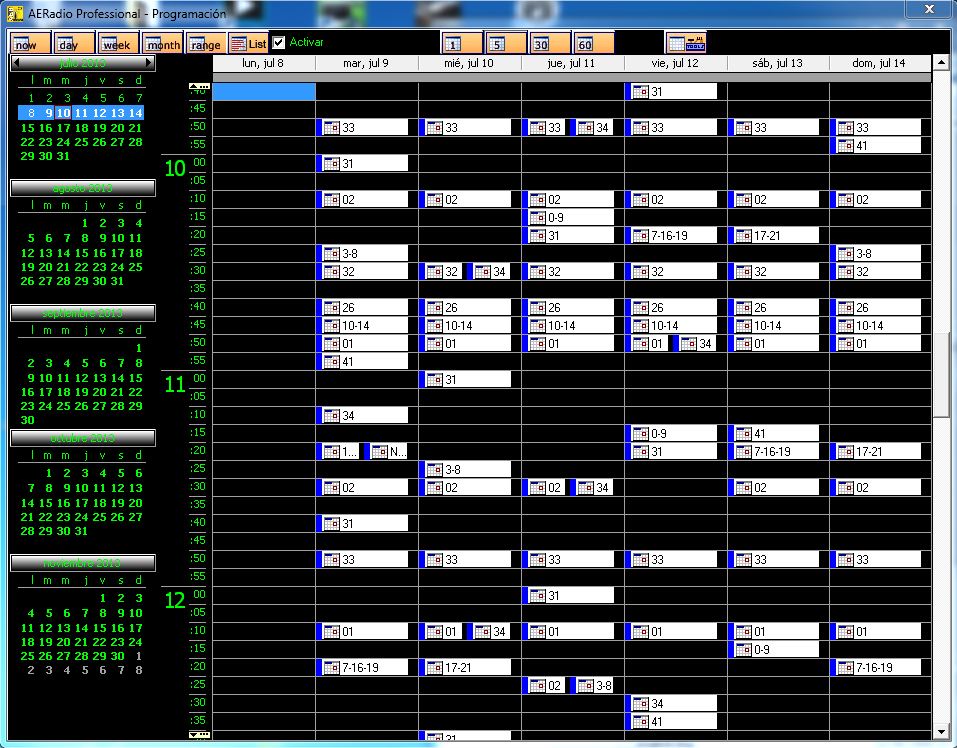
Automatic: With our schedule module and its planning view, you can schedule music, jingles and advertising you want to broadcast. Forget everyghing else. AERadio launches all your schedule for you at the dates and hours previously set by you. This module lets you create and send out all your music, jingles, advertising and others.
AERadio is the solution for
HOTELS, SHOPS, INTERNET STATIONS, RESTAURANTS, RADIO STATIONS, THEATERS, AUDITORIUMS, SHOPPING CENTERS, NIGHT CLUBS… etc.
By means three digital players, AERadio carries out all broadcast tasks: music, audio files, advertising and jingles.
It can easily play audio files from other windows by dragging them to the choosen playlist.
It is a perfect tool to administer file blocks, with available repeat and random options, in order to leave your company without staff in charge of your broadcasts for long periods of time.
The automate schedule module makes possible to schedule complete blocks that will be broadcasted at the dates and hours previously set by you. Thanks to this module, you could have your business closed, leaving automatic broadcast for several weeks or months.
It offers fading out, pre-listening, sound effects and the possibility to work simultaneously with several sound cards, in order to get different audio broadcasts with the same software.
Automatic jingle insertion, hour signals, linking up with any external sound source (satellites, tuners, players or internet URL´s.
Network running
Internet broadcast: Shoutcast/through professional streaming is optional
Electric protection
Auto- scheduling assistant
ALL INFORMATION: https://www.aeradio.es


